What is 3D Render Videos and How to Use Them Effectively?
3D Render Videos have revolutionized the way we visualize concepts. These videos use cutting-edge technology to create realistic animations and images. From architectural designs to product showcases, their applications are vast. They allow viewers to experience a space or object before it even exists. However, achieving effective 3D Render Videos is not always easy.
Creating captivating visuals requires technical skill and artistic vision. The process often involves multiple layers of planning and creativity. It's not just about rendering images; it’s about telling a story. The use of 3D Render Videos can enhance presentations, marketing, and education. Therefore, understanding how to utilize them effectively is crucial. Mistakes can lead to miscommunication or disinterest.
As the industry evolves, staying updated on best practices is vital. Learning from past projects and refining techniques can improve outcomes. 3D Render Videos can mesmerize audiences if done right. However, they require constant learning and adaptation. Embracing feedback helps enhance quality and engenders trust.
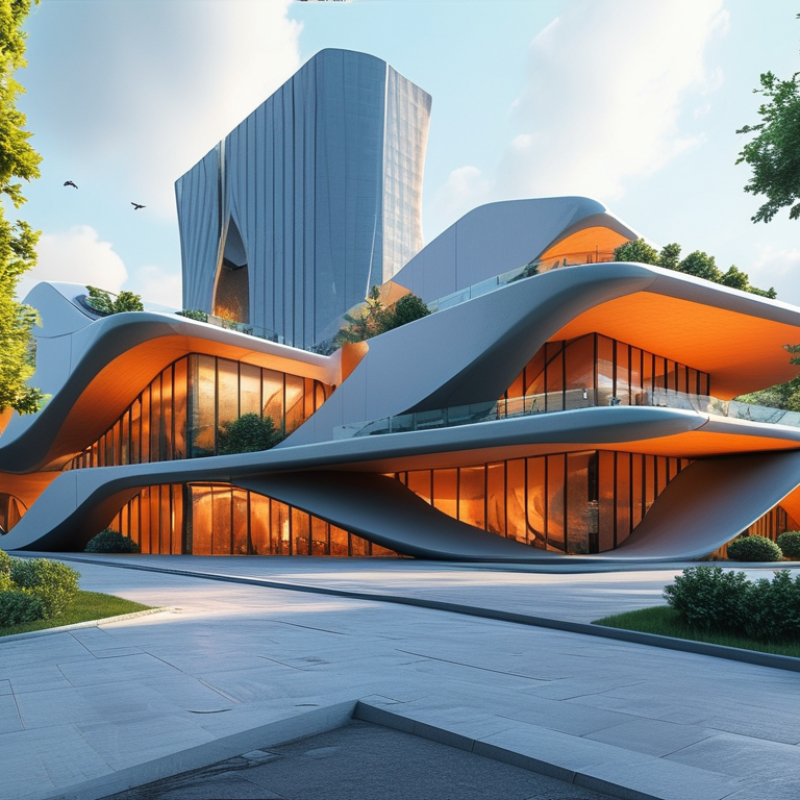
What is 3D Rendering in Video Production?
3D rendering is a pivotal aspect of video production. It transforms digital models into lifelike images or animations. This process is crucial for creating stunning visuals that captivate audiences. Designers use specialized software to undertake this complex task, ensuring the final output aligns with project goals.
Incorporating 3D rendering into your video can enhance storytelling. It introduces depth and realism that 2D graphics simply can't achieve. For instance, a product visualization can be incredibly detailed, showcasing its features from every angle. This immersion engages viewers, making the content more memorable. However, over-reliance on 3D elements might sometimes overwhelm the narrative. It's essential to strike a balance.
Effective use of 3D rendering involves planning. Understanding the audience's expectations is key. When visuals align with the message, the impact is stronger. Yet, some creators may misuse 3D rendering, leading to confusion rather than clarity. Regularly evaluating the effectiveness of your visuals ensures that they serve the intended purpose. Careful analysis can help refine approach and enhance results.
The Process of Creating 3D Render Videos
Creating 3D render videos involves several key steps. Initially, artists begin with concept sketches. These sketches outline the idea, mood, and character design. The process transitions to 3D modeling, where software tools bring concepts to life. Precision is important here. Each model must be detailed and scaled correctly.
Next comes the texturing phase. This includes adding color, patterns, and materials to the models. Texture mapping requires an eye for realism, as choices impact the video's overall feel. Lighting setup follows texturing. Proper lighting creates depth and enhances visual appeal. It can dramatically affect how viewers perceive the scene.
After finalizing these elements, artists move to rendering. This process can be time-consuming. Errors can arise from incorrect settings or overlooked details. Regular reviews during this stage can prevent frustration later. Each render iteration may reveal new improvements, sparking fresh ideas. Embracing this cycle can ultimately lead to higher quality content.
3D Render Video Usage Statistics
Key Software Tools for 3D Render Video Creation
Creating 3D render videos requires the right software tools to achieve impressive results. Popular tools include Blender, Autodesk Maya, and Cinema 4D. Each tool has unique features that cater to different creation styles. Blender is open-source and versatile, ideal for beginners and professionals alike. Autodesk Maya excels in character animation and modeling. Cinema 4D is renowned for motion graphics.
The user interface of each tool can be intimidating. Learning curves vary significantly. For instance, Blender has extensive community support, offering tutorials and forums. Autodesk Maya requires focused effort to master its tools. Cinema 4D is user-friendly, but not without its own complexities. Understanding the software's capabilities can vastly improve video quality.
Integration is another factor to consider. These software tools can often work well with other applications. However, compatibility issues may arise. It's essential to test different workflows to find the most efficient method. Experimentation can lead to unexpected results, which can be both challenging and rewarding. By embracing these nuances, creators can refine their skills and develop a unique style in 3D render video creation.
What is 3D Render Videos and How to Use Them Effectively? - Key Software Tools for 3D Render Video Creation
| Tool Name | Key Features | Best For | Price |
| Blender | Open-source, supports 3D modeling, animation, and rendering. | Independent artists and small studios. | Free |
| Autodesk Maya | Powerful modeling and animation tools, industry-standard. | Film and game studios. | $1,700/year |
| Cinema 4D | Intuitive interface, great for motion graphics. | Motion graphics designers. | $59/month |
| V-Ray | High-quality rendering engine, realistic lighting and materials. | Architects and visual effects artists. | $1,040/license |
| Adobe After Effects | Compositing, motion tracking, and visual effects. | Video editors and content creators. | $20.99/month |
Effective Techniques for Utilizing 3D Render Videos
3D render videos are powerful tools that can elevate your project’s visual impact. To maximize their potential, it’s essential to use effective techniques. Start by ensuring high-quality models and textures. Poor designs can distract your audience. Focus on details like lighting and shadows. These elements enhance realism and keep viewers engaged.
Engage your audience emotionally. Use storytelling techniques to connect on a deeper level. A compelling narrative can make a simple 3D render captivating. Experiment with camera angles and movement. Dynamic shots can highlight the features of your product or concept. Pay attention to pacing. A slow reveal can build suspense, while quick cuts can energize a scene.
However, be cautious not to overuse effects. Excessive motion or filters can dilute your message. Balance creativity with clarity. Allow your render video to communicate your ideas effectively. Reflect on viewer feedback to refine your approach. Each project is an opportunity to learn and improve. Create with intention, and you’ll see meaningful results.
Applications of 3D Render Videos in Various Industries
In today's competitive landscape, 3D render videos are powerful tools for various industries. These animations can transform complex concepts into easily digestible visual narratives. The architecture industry relies heavily on 3D rendering. It allows architects to present their designs vividly. Clients can virtually walk through buildings before construction begins. This not only enhances understanding but also minimizes costly revisions.
In the gaming sector, 3D render videos set the stage for immersive experiences. They help developers showcase gameplay and graphics before launch. Early feedback from viewers can highlight areas for improvement. This iterative process is crucial, as it ensures a refined final product. Similarly, the automotive industry utilizes 3D renderings in marketing campaigns. Stunning visuals help highlight new features and designs, capturing potential buyers' attention.
In healthcare, 3D rendering is revolutionizing patient education. Doctors can explain complex procedures through animated visuals. This approach enhances patient comprehension and engagement. However, the challenge lies in producing accurate and trustworthy content. Misinformation can lead to misunderstanding, which is detrimental to patient trust. Thus, as 3D render videos gain traction, the importance of precision becomes paramount across all these fields.
